Aesthetic diagrams,
straight from
the code.
No boxes to drag, no lines to route. Your agent reads the code and archgram draws the diagram: one SVG, light and dark, with the flows animated.

npx skills add byabas/archgram01The spec
Start with words, not boxes.
Everything archgram draws comes from one small YAML file: the parts of your system, what calls what, and the way a request goes through it. It lives beside the code and is reviewed like it. Or skip writing it: give the skill to your agent, and watch it write the spec from your code while you finish your coffee.
npx skills add byabas/archgram
- nodeswhat runs or is stored, with its kind and logo
- frameswhat runs together
- edgeswhat calls or reads what
- flowsthe way a request goes
archgram: 1title: linkshortdescription: >- The API creates short links and redirects. A redirect reads the URL from the Redis cache, falls back to Postgres on a miss, adds the click to a Redis stream and returns. A worker drains the stream in batches and adds the counts to Postgres, where the stats route reads them.nodes: - { id: browser, kind: browser, label: Visitor } - { id: api, kind: service, label: API, note: "FastAPI, port 8000", tech: fastapi } - { id: cache, kind: cache, label: URL cache, note: "1-day TTL", tech: redis, frame: redis } - { id: clicks, kind: queue, label: Click stream, tech: redis, frame: redis } - { id: worker, kind: service, label: Worker, note: up to 500 per read } - { id: postgres, kind: database, label: links, note: source of truth, tech: postgresql }frames: - { id: redis, label: Redis }edges: - { from: browser, to: api } - { from: api, to: cache } - { from: api, to: postgres, label: on a miss, style: dashed } - { from: api, to: clicks } - { from: clicks, to: worker } - { from: worker, to: postgres }flows: - { name: a visit, steps: [browser, api, clicks, worker, postgres] }02Layout
Every part in its place.
No dragging, no lining things up. archgram puts every part in order, the way a request travels through them, left to right or top to bottom if you prefer. Parts that run together share a frame.
03Routing
Lines go around, never through.
Every line finds its own way around the cards, with soft rounded bends. A dashed line marks a step that happens only sometimes.
04Flows
Then the request moves.
Name the steps a request takes, and archgram plays them inside the SVG itself. No script and no player, so it moves wherever an image shows, in a GitHub README, on npm, on any page. As the arrow reaches a card, its border draws itself in.


05Refused at the gate
A flow can be told no.
One line in the spec shows where a flow gets turned away. A ✕ lands at the step that says no, the refusal travels back to where it started, and the card stays red until a flow gets through and turns it green.
Scroll to play it forward and back.
06Light, dark, your colours
One file, both themes.
The same SVG carries light and dark, and follows the reader's system. Need a file for each? archgram writes both.
Match it to your design system. Bring your tokens and archgram draws in your colours, and tells you when two of them are too close to read.
—Samples
Real outputs, untouched.
No retouching, no mockups. Each drawing is one small spec, drawn by archgram. Open it under the drawing and copy it to try yourself.
Architecture
What a system is made of, and the path a request takes through it.
A coding agent with toolsagent.archgram.yaml
archgram: 1credit: falsetitle: A coding agent with toolsdescription: >- A chat sends the question to the agent, which reasons with Claude and calls its tools: search_docs reads a Qdrant index of the docs, query_db reads the Postgres warehouse and run_code runs in a Docker sandbox. Every night a Python script embeds the docs with Mistral into the index.signal: cometglow: truenodes: - { id: chat, kind: browser, label: Chat, note: React, tech: react } - { id: agent, kind: agent, label: Agent, note: plans and calls tools, tech: claude, frame: loop } - { id: llm, kind: model, label: Claude, note: reasoning, tech: anthropic, variant: external, frame: loop } - { id: search, kind: tool, label: search_docs, frame: loop } - { id: sql, kind: tool, label: query_db, frame: loop } - { id: run, kind: tool, label: run_code, note: sandbox, tech: docker, frame: loop } - { id: vec, kind: vector-store, label: Docs index, tech: qdrant } - { id: db, kind: database, label: Warehouse, tech: postgresql } - { id: docs, kind: file, label: docs/, note: Markdown, frame: nightly } - { id: ingest, kind: script, label: ingest.py, tech: python, frame: nightly } - { id: embed, kind: model, label: Embeddings, tech: mistralai, variant: external }frames: - { id: loop, label: Agent loop } - { id: nightly, label: Nightly }edges: - { from: chat, to: agent } - { from: agent, to: llm, label: think } - { from: agent, to: search } - { from: agent, to: sql } - { from: agent, to: run } - { from: search, to: vec } - { from: sql, to: db } - { from: docs, to: ingest } - { from: ingest, to: embed } - { from: embed, to: vec }flows: - { name: indexing the docs, steps: [docs, ingest, embed, vec] } - { name: a question, steps: [chat, agent, [search, sql], [vec, db]] } - { name: trying the fix, steps: [chat, agent, run] }
Checkout on the edgesaas.archgram.yaml
archgram: 1credit: falsetitle: Checkout on the edgedescription: >- The Next.js storefront on Vercel sends each checkout through edge middleware, which asks Clerk to verify the session before the checkout API reads the cart from Upstash Redis and charges with Stripe. Stripe's webhook starts a Temporal workflow that writes the order to Supabase and sends the receipt with Resend. A guest's checkout is refused at the session check; signed in, it goes through.direction: downsignal: sparkglow: truenodes: - { id: web, kind: browser, label: Storefront, note: Next.js, tech: nextdotjs } - { id: edge, kind: service, label: Middleware, note: at the edge, tech: vercel, frame: vercel } - { id: auth, kind: service, label: Session, note: verify, tech: clerk, variant: external } - { id: api, kind: service, label: Checkout API, note: route handlers, tech: nodedotjs, frame: vercel } - { id: cart, kind: cache, label: Cart, tech: upstash, variant: external } - { id: pay, kind: service, label: Payments, tech: stripe, variant: external } - { id: flow, kind: service, label: Fulfilment, note: durable workflow, tech: temporal } - { id: db, kind: database, label: orders, tech: supabase } - { id: mail, kind: service, label: Receipts, tech: resend, variant: external }frames: - { id: vercel, label: Vercel }edges: - { from: web, to: edge } - { from: edge, to: auth } - { from: auth, to: api, label: signed in } - { from: api, to: cart } - { from: api, to: pay } - { from: pay, to: flow, label: webhook } - { from: flow, to: db } - { from: flow, to: mail }flows: - { name: a guest checks out, steps: [web, edge, auth], stop: auth } - { name: "signed in, the order goes through", steps: [web, edge, auth, api, pay, flow, [db, mail]] }
One set of gates for agent, person and CIcommit-gates.json
{ "archgram": 1, "credit": false, "title": "One set of gates for agent, person and CI", "description": "An agent's edit or commit goes through its hooks in .claude/hooks/design-system, a person's commit through the git pre-commit hook, and CI calls the core directly. All three run a stage of design-system/harness/gates.mjs, which reads design-system/gates.json and runs the token and rules checks against the DTCG tokens and DESIGN.md. A commit with a raw colour is refused at the checks and goes back to the person; fixed, it passes.", "direction": "down", "nodes": [ { "id": "agent", "kind": "agent", "label": "Claude Code", "note": "an edit, a commit", "tech": "claude", "variant": "external" }, { "id": "person", "kind": "users", "label": "A person", "note": "git commit" }, { "id": "ci", "kind": "service", "label": "CI job", "note": "optional", "tech": "githubactions" }, { "id": "adapters", "kind": "script", "label": ".claude/hooks/design-system", "note": "only translate", "frame": "claude" }, { "id": "precommit", "kind": "script", "label": "pre-commit", "note": "git hook" }, { "id": "core", "kind": "script", "label": "harness/gates.mjs", "note": "every decision", "frame": "ds" }, { "id": "gates", "kind": "file", "label": "gates.json", "note": "what runs, and when", "frame": "ds" }, { "id": "checks", "kind": "check", "label": "checks/", "note": "tokens and rules contract", "frame": "ds" }, { "id": "tokens", "kind": "file", "label": "tokens/", "note": "DTCG, the one source of values", "frame": "ds" }, { "id": "designmd", "kind": "file", "label": "DESIGN.md", "note": "rules, no values" } ], "frames": [ { "id": "claude", "label": "The agent's own folder" }, { "id": "ds", "label": "design-system/ names no agent" } ], "edges": [ { "from": "agent", "to": "adapters" }, { "from": "person", "to": "precommit" }, { "from": "ci", "to": "core", "label": "before-commit" }, { "from": "adapters", "to": "core" }, { "from": "precommit", "to": "core", "label": "before-commit" }, { "from": "core", "to": "gates" }, { "from": "core", "to": "checks" }, { "from": "checks", "to": "tokens" }, { "from": "checks", "to": "designmd" } ], "flows": [ { "name": "a commit with a raw colour", "steps": [ "person", "precommit", "core", "checks" ], "stop": "checks" }, { "name": "the commit again, fixed", "steps": [ "person", "precommit", "core", "checks", [ "tokens", "designmd" ] ] } ]}
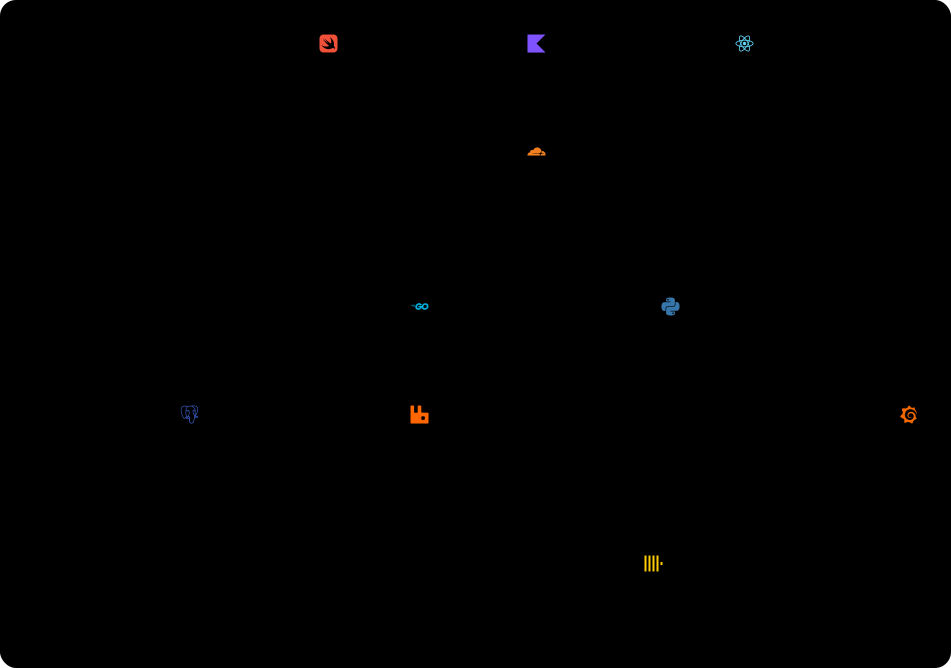
One platform, three appsplatform.archgram.yaml
archgram: 1credit: falsetitle: One platform, three appsdescription: >- The iOS, Android and web apps call one Cloudflare gateway. On Kubernetes, the Go orders service writes to Postgres and publishes each order to RabbitMQ, which streams it into ClickHouse; the Python recommendations service reads ClickHouse, and Grafana charts it.direction: downsignal: pulseglow: truenodes: - { id: ios, kind: mobile, label: iOS, tech: swift } - { id: android, kind: mobile, label: Android, tech: kotlin } - { id: web, kind: browser, label: Web, tech: react } - { id: gw, kind: service, label: Gateway, tech: cloudflare, variant: external } - { id: orders, kind: service, label: Orders, note: 6 pods, tech: go, variant: multi, frame: k8s } - { id: recs, kind: service, label: Recommendations, tech: python, variant: multi, frame: k8s } - { id: events, kind: queue, label: Events, tech: rabbitmq, frame: k8s } - { id: pg, kind: database, label: Orders DB, tech: postgresql } - { id: olap, kind: database, label: Analytics, tech: clickhouse } - { id: dash, kind: service, label: Dashboards, tech: grafana }frames: - { id: k8s, label: Kubernetes }edges: - { from: ios, to: gw } - { from: android, to: gw } - { from: web, to: gw } - { from: gw, to: orders } - { from: gw, to: recs } - { from: orders, to: pg } - { from: orders, to: events } - { from: events, to: olap, label: stream } - { from: recs, to: olap } - { from: dash, to: olap }flows: - { name: an order, steps: [ios, gw, orders, events, olap] } - { name: a recommendation, steps: [web, gw, recs, olap] }linkshortlinkshort.archgram.yaml
archgram: 1credit: falsetitle: linkshortdescription: >- The API creates short links and redirects. A redirect reads the URL from the Redis cache, falls back to Postgres on a miss, adds the click to a Redis stream and returns. A worker drains the stream in batches and adds the counts to Postgres, where the stats route reads them.nodes: - { id: browser, kind: browser, label: Visitor } - { id: api, kind: service, label: API, note: "FastAPI, port 8000", tech: fastapi } - { id: cache, kind: cache, label: URL cache, note: "1-day TTL", tech: redis, frame: redis } - { id: clicks, kind: queue, label: Click stream, tech: redis, frame: redis } - { id: worker, kind: service, label: Worker, note: up to 500 per read } - { id: postgres, kind: database, label: links, note: source of truth, tech: postgresql }frames: - { id: redis, label: Redis }edges: - { from: browser, to: api } - { from: api, to: cache } - { from: api, to: postgres, label: on a miss, style: dashed } - { from: api, to: clicks } - { from: clicks, to: worker } - { from: worker, to: postgres }flows: - { name: a visit, steps: [browser, api, clicks, worker, postgres] }Sequence
The order in which the parts of a system call each other for one request, and what comes back.
Sign insequence-sign-in.archgram.yaml
archgram: 1diagram: sequencecredit: falsetitle: Sign indescription: >- The browser posts the login to the API, which finds the user in Postgres; with the right password the API returns a session, and otherwise refuses with a 401.participants: - { id: browser, kind: browser, label: Browser } - { id: api, kind: service, label: API, tech: nodedotjs } - { id: db, kind: database, label: Users, tech: postgresql }messages: - phase: Sign in - { from: browser, to: api, label: POST /login } - phase: Check the password - { from: api, to: db, label: find user } - { reply: db, label: user } - alt: - when: password matches messages: - { reply: api, label: session } - when: else messages: - { reply: api, label: "401", refused: true }

OAuth sign insequence-oauth.archgram.yaml
archgram: 1diagram: sequencecredit: falselook: avatarstitle: OAuth sign indescription: >- The web app sends the user to the identity provider, which asks for consent and returns a code; the app checks its state, trades the code for a token while it warms the profile cache, then reads the profile page by page, signing in again when the token has expired.participants: - { id: user, kind: users, label: User } - { id: app, kind: service, label: Web app, tech: nextdotjs } - { id: idp, kind: service, label: Identity provider, variant: external, tech: auth0 } - { id: api, kind: service, label: Profile API, variant: multi }messages: - phase: Ask for consent - { from: user, to: app, label: Sign in } - { from: app, to: idp, label: redirect to /authorize with the client id and scopes } - { from: idp, to: user, label: ask for consent } - { reply: user, label: consent } - { reply: idp, to: app, label: code } - phase: Trade the code - { from: app, to: app, label: verify state } - par: - messages: - { from: app, to: idp, label: exchange code } - { reply: idp, label: token } - messages: - { from: app, to: api, label: warm cache, async: true } - phase: Read the profile - loop: when: for each page of the profile messages: - { from: app, to: api, label: GET /me } - alt: - when: token valid messages: - { reply: api, label: profile } - when: else messages: - { reply: api, label: "401", refused: true }—Install
Install it, then just ask.
One line gives archgram to your agent, and from then on a diagram is one sentence away.
npx skills add byabas/archgramIn a terminal, npx skills add byabas/archgram adds archgram for your agents. Asked “Draw this project's architecture with archgram.”, the agent reads the code, writes linkshort.archgram.yaml and draws linkshort.svg, in light and dark.
what-is
archgram is an open-source CLI tool for software architecture diagrams. Write a YAML or JSON spec, or let Claude Code, Codex, Cursor or Gemini CLI draw one from your code. It writes one self-contained SVG that follows light and dark mode and animates the path a request takes. The file drops into a GitHub README or any docs page, and the animation plays wherever an image shows.
what-is
archgram is an open-source CLI tool for software architecture diagrams. Write a YAML or JSON spec, or let Claude Code, Codex, Cursor or Gemini CLI draw one from your code. It writes one self-contained SVG that follows light and dark mode and animates the path a request takes. The file drops into a GitHub README or any docs page, and the animation plays wherever an image shows.
github-readme
Yes. The flows are animated with SMIL inside the SVG, which needs no script, so the drawing moves in an <img>: in a GitHub README, on npm and in any docs page.
dark-mode
One SVG carries both themes and follows the reader's system setting. To follow GitHub's own theme instead, draw with --split-themes and put the two files in a <picture> with prefers-color-scheme.
offline
No. archgram is one native binary, and the SVG is self-contained: no script, no external file, no web font, so it shows the same wherever it is opened.
vs-mermaid
Mermaid draws many kinds of diagram from text and is rendered by the page that shows it; GitHub renders it in Markdown. archgram draws two kinds, the architecture of a system and the sequence of one request, into an SVG file ahead of time: it routes the lines around the cards, animates the flows and embeds its font, so the file looks the same everywhere. For a chart, or a kind archgram does not draw, Mermaid is the better tool.
vs-drawio
draw.io and Excalidraw are canvases you arrange by hand, which suits a sketch. archgram places everything from the spec, so the diagram lives in git beside the code and changes in a diff when the system does.
vs-d2
D2 is a language for many kinds of diagram, and PlantUML draws UML from text, such as sequence, class and deployment diagrams. archgram draws two kinds, the architecture of a system and the sequence of one request, from a spec in plain YAML or JSON that an agent can write from the code; it routes the lines, animates the flows inside the SVG and gives the same file on every machine. For the rest of UML, PlantUML is the better tool; for a diagram in many shapes, D2 is.
vs-structurizr
Structurizr models a system once in its DSL and draws several C4 views from that model; it is the C4 model's reference implementation. archgram draws one diagram per spec, the parts and the path a request takes, as an animated SVG for a README or a docs page. To keep several C4 views in step, Structurizr is the better tool.
agent
Yes, with the archgram skill: it reads the code, draws a part only where a file backs it and an edge only where a line of code makes it, and lists both.
in-sync
Keep the spec in git beside the code. archgram redraws the diagram from it, and its agent skill can write the spec again from the code, so the diagram changes in the same pull request as the system.
your-colours
Yes: --theme-file maps archgram's colour roles to your design tokens (W3C Design Tokens), and refuses colours that fall short of contrast.
same-file
Yes, byte for byte, on every machine, so a diagram changes in git only when the system does.